Advanced Options
SecureEngine has many internal options for compatibility with specific applications. Most are rarely needed and do not affect security, so they are not shown by default.
When an application needs a special compatibility option, we provide the required key and value. Select Add below the table to enter it. To remove an option, select its row and then select Delete.
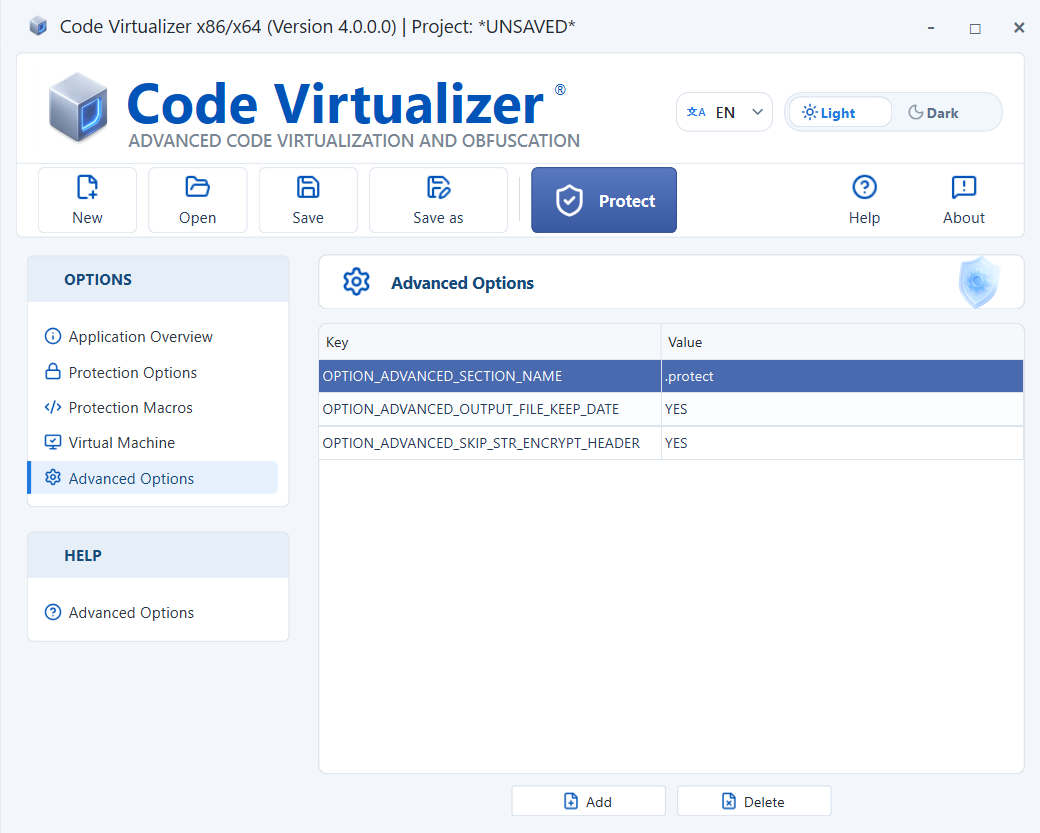
The available keys depend on the product version and the compatibility requirement. Do not copy settings from the screenshot unless they have been recommended for your application.
Output and reproducibility
-
OPTION_ADVANCED_SECTION_NAME=<name>: Sets the name of the runtime code region added to the protected application. Use 1 to 8 visible ASCII characters. The data region appends2, or replaces the eighth character with2(3when the name already ends in2). For example,mysecproducesmysecandmysec2. -
OPTION_ADVANCED_OUTPUT_FILE_KEEP_DATE=YES|NO: Copies the input file's creation and last-modification timestamps to the protected output. It does not change the last-access time or internal executable timestamps such as the PETimeDateStamp. The default isNO, and timestamp precision depends on the destination filesystem. -
OPTION_ADVANCED_REMOVE_STATIC_SYMBOLS=YES|NO: Removes non-essential symbol information from protected ELF applications. This information is useful for debugging and analysis but is not required for the application to run. Information required by the operating system to load the application is preserved. The default isNO. This option currently has no effect on PE or Mach-O files and is independent ofOPTION_ADVANCED_REMOVE_DEBUG_INFO. Enabling it may make debugging and crash analysis more difficult. -
OPTION_ADVANCED_SKIP_PROTECTED_MARKER=YES|NO: Prevents Code Virtualizer from adding the marker it normally uses to recognize protected files. The default isNO. When set toYES, the protected-file check reports the resulting application as Not protected, and Code Virtualizer may not recognize it as an already protected input. This option does not change how the selected code is virtualized. Enable it only when automatic protected-file detection is not required. -
OPTION_ADVANCED_SKIP_EXCEPTION_SECTIONS=YES|NO: Prevents Code Virtualizer from creating separate sections for exception-handling information generated by virtualized code. Instead, this information is stored with the other protection data or inside the configured Stealth Areas. The default isNO. This option does not disable exception handling and does not remove or rename exception information already present in the application. It currently applies only to x64 PE files. Protection fails if the selected protection area does not have enough available space. -
OPTION_ADVANCED_SKIP_RELOCATION_SECTION=YES|NO: Prevents Code Virtualizer from creating a separate section for relocation information in protected PE applications. Instead, the application's relocations and any additional relocations required by the protection are stored with the other protection data or inside the configured Stealth Areas. The default isNO. Unlike Strip Relocations, this option does not remove relocation information or change whether the application uses ASLR. It has no effect on ELF or Mach-O files. Protection fails if the selected protection area does not have enough available space. -
OPTION_ADVANCED_INITIAL_SEED=<u64|0xHEX>: Sets the initial seed from which Code Virtualizer derives its protection seeds. Decimal and0xhexadecimal values are accepted. A missing, empty, invalid, or zero value uses automatic non-zero seed generation. -
OPTION_ADVANCED_RUNTIME_PADDING_MODE=AUTO|ZERO|TRAP: Selects how unused runtime code and data ranges are filled. The defaultAUTOuses valid filler instructions for code and seed-derived bytes for data.ZEROleaves unused ranges zero-filled for debugging and binary comparisons.TRAPuses architecture-specific trap instructions for code and zeros for data. Invalid values are rejected.
Macro selection and destruction
-
OPTION_MACROS_DISABLE_ALL_MACROS=YES|NO: Disables all user-inserted protection macros and all manual or MAP-file ranges. The default isNO. When enabled, this option takes precedence over the individual RVA list below. -
OPTION_MACROS_DISABLE_AT_RVA_NUMBER=<count>: Sets the number of macro blocks disabled individually by RVA. A missing value or0disables no blocks by RVA. -
OPTION_MACROS_DISABLE_AT_RVA_AT_N=<rva>: Specifies the start-body RVA of each disabled block.Nis zero-based and must be smaller thanOPTION_MACROS_DISABLE_AT_RVA_NUMBER. The value is an image-relative RVA, not a file offset or full virtual address. Duplicate RVAs have no additional effect. -
OPTION_ADVANCED_MACRO_DESTROY_TYPE=INT3|NOP|ZERO|GARBAGE: Selects how the original START marker, protected body and END marker bytes are destroyed after protection. Virtualized marker-backed code continues after the complete END marker, so its destroyed bytes are not executed; any bytes owned by a required native return bridge remain preserved.INT3uses architecture-specific break instructions,NOPuses NOP instructions,ZEROfills every destroyed byte with0x00, andGARBAGEuses random bytes. A missing, empty, or unrecognized value uses architecture-valid random instructions. -
OPTION_ADVANCED_MANUAL_VM_MACRO_N=0xSTART - 0xEND: Adds a headerless macro block over the specified executable RVA range.Nstarts at1, and indices may contain gaps. -
OPTION_ADVANCED_MANUAL_VM_MACRO_ID_N=<u64>: Selects the behavior of the corresponding manual macro. A missing value or0virtualizes it with the Virtual Machine assigned to legacy generic macros.1mutates the range. A value greater than1virtualizes it with that explicit Virtual Machine ID.
MUTATE macros
OPTION_ADVANCED_MUTATION_RECURSION=<0..32>: Sets the number of additional recursive Opcode Paradise mutation levels applied to each eligible native instruction in MUTATE macros. The default is2. A value of0still applies the initial mutation pass but adds no recursive levels; a positive value requests that many additional levels. Only whole numbers from0to32are valid; a malformed or out-of-range value causes project configuration to fail. This option does not affect Virtual Machine runtime prolog mutation or generic runtime-module mutation.
String Encrypt
-
OPTION_ADVANCED_STR_ENCRYPT_IN_DATA_SECTION=YES|NO: Places String Encrypt data in a data section when enabled. The default isNO. -
OPTION_ADVANCED_SKIP_STR_ENCRYPT_HEADER=YES|NO: Prevents preservation of the original String Encrypt pre-header bytes when enabled. The default isNO. -
OPTION_MACROS_ENCRYPT_STRINGS_FORCE_DESTROY=YES|NO: Forces String Encrypt to destroy the original string bytes even when other code appears to reference them. The default isNO. Enable this only when you know that the reported external references do not require the original string.
Virtual Machine runtime
-
OPTION_ADVANCED_MAX_CPUS_IN_EACH_VM_INSTANCE=<u32>: Sets the number of independent runtime state slots in each Virtual Machine. These slots allow multiple application threads to enter the same Virtual Machine without sharing execution state. A missing or zero value uses32. This option does not control how many CPU cores Code Virtualizer uses during protection. -
OPTION_ADVANCED_NUMBER_BOOTSTRAP_IN_VM=<u32|min..max>: Sets the number of equivalent bootstrap implementations generated for each Virtual Machine. Exact values such as8and ranges such as8..12or[8..12]are accepted. A missing value uses8..12. This option increases bootstrap diversity; it does not control runtime concurrency. -
OPTION_ADVANCED_VM_ENTRY_TRANSFER_MODE=DIRECT|ENCODED_DELTA_V1: Controls how protected code enters its Virtual Machine.DIRECTuses the standard entry method and is the default.ENCODED_DELTA_V1adds an encoded intermediate step that makes the actual Virtual Machine entry harder to identify. This setting applies to every Virtual Machine used during protection. Any other value causes project configuration to fail.
Protection performance
-
OPTION_ADVANCED_IS_MULTICORE_PROTECTION=YES|NO: Enables concurrent work while protecting an application. The default isYES.NOforces all protection and Virtual Machine creation work to use one worker. -
OPTION_ADVANCED_LIMIT_CORES_FOR_PROTECTION=<count>: Sets the general worker limit for input analysis, macro mutation, string processing, and virtualization. It also limits the two Virtual Machine worker options below. A missing or zero value uses the smaller of32and the number of available hardware threads. -
OPTION_ADVANCED_VM_PREPARATION_WORKERS=<count>: Sets how many independent Virtual Machine instances may be prepared concurrently. A missing or zero value uses4, limited by the general protection worker count. -
OPTION_ADVANCED_VM_CREATION_WORKERS=<count>: Overrides the number of internal workers used independently by each Virtual Machine creation. It does not create one shared worker pool for all Virtual Machines. A missing or zero value uses the Virtual Machine defaults: normally2, or4for revirtualized or handler-mutating Virtual Machines. The effective value cannot exceed the general protection worker count.