Protection Options
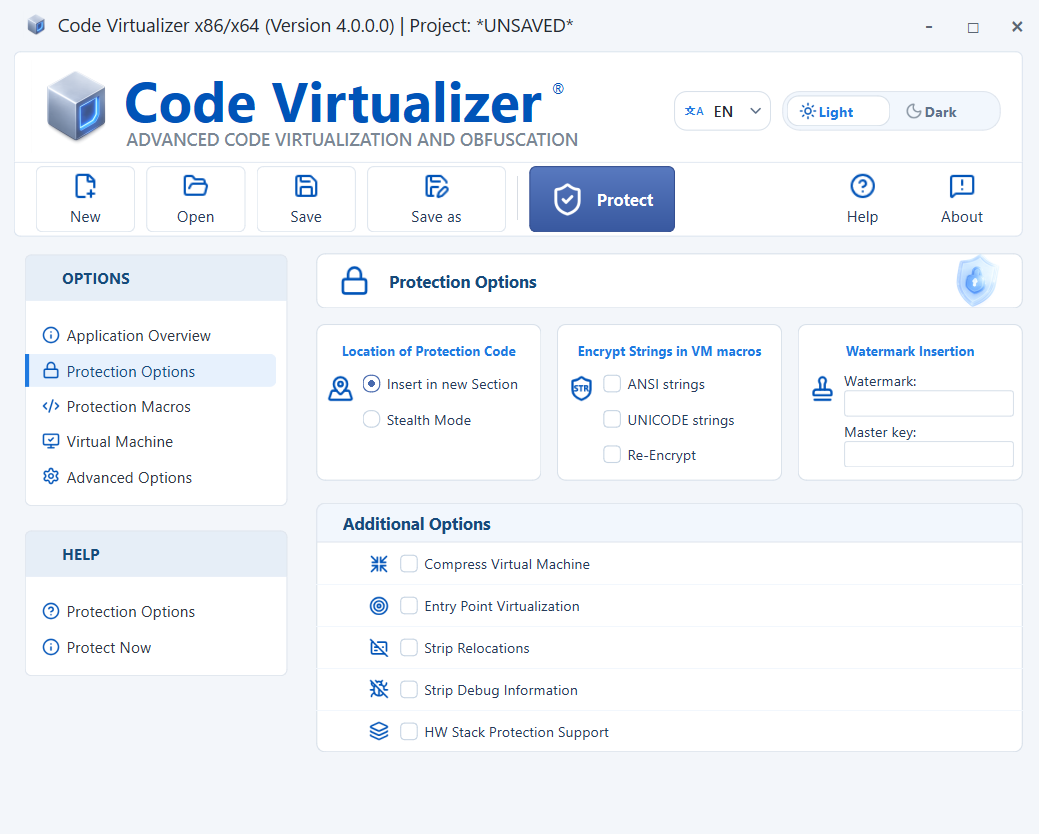
Location of Protection Code
Code Virtualizer can place its protection code in several locations. The selected location affects how easily external tools can identify the protection.
-
Insert in new Section: Creates a new PE section for the protection code without modifying the existing sections.
-
Stealth Mode: Places the protection code in reserved space inside your application code. The
StealthModeexamples show how to reserve this space in supported programming languages.
Encrypt Strings in VM macros
This option finds strings referenced inside VIRTUALIZER markers and removes them from their original data locations. When protected code accesses a string, Code Virtualizer decrypts it at a different location and passes it to the application.
The Protection Macros panel lists the ANSI and Unicode strings found inside each macro.
Select ANSI strings and/or UNICODE strings to match the strings inside your VIRTUALIZER markers.
Re-Encrypt encrypts the string again when the STR_ENCRYPT_END or VIRTUALIZER_END marker runs. A return inside the protected block can bypass the END marker and leave the string decrypted. If several threads can run the block concurrently, protect the START/END region with a critical section:
void ProtectedFunction()
{
    EnterCriticalSection(&cs);

    VIRTUALIZER_START;

    // Your code here
    std::cout << "Protected code execution" << std::endl;

    VIRTUALIZER_END;

    LeaveCriticalSection(&cs);
}
Compress Virtual Machine
This option compresses all Virtual Machines added to the protected file together with the virtualized code.
When a virtualization macro runs for the first time, Code Virtualizer decompresses the Virtual Machines and virtualized code. This causes a small delay during that first execution. Later virtualization macros use the already decompressed code and do not repeat the process.
Compression is not available when the protection code uses Stealth Mode insertion.
Entry Point Virtualization
This option is equivalent to placing a VM macro around the application's first instructions. Disable it if the protected application does not start.
Strip Relocations
This option removes the relocation section from EXE files to reduce the protected application size.
Strip Debug Information
This option removes debug information from the protected output.
Watermark Insertion
Use Watermark and Master key to configure a watermark for the protected application. Leave these fields empty when no watermark is required.
To extract the watermark from a protected application, run:
Use the same master key that was used when protecting the application.
HW Stack Protection Support
This option adds compatibility with applications that have been compiled with hardware-enforced stack protection (/CETCOMPAT) to guard against control-flow hijacking attacks by securing return addresses.